

Introduction
I used to think messy charging spots were normal. A few cables here, a power strip there… and somehow it always turned into a tangled mess. The real problem wasn’t the number of devices. It was how the cords were handled.
Once I started using better charging station organization ideas, the difference was obvious. Clean surfaces, no cable chaos, and everything stayed easy to use.
The goal is simple. Keep cords controlled, not just hidden. When wires have a clear path and limit, the mess doesn’t come back.
If you want to fix this properly instead of constantly adjusting cables, these cable organization hacks show how to control wires so the mess doesn’t come back.
Drawer-Based Charging Stations That Keep Everything Out of Sight
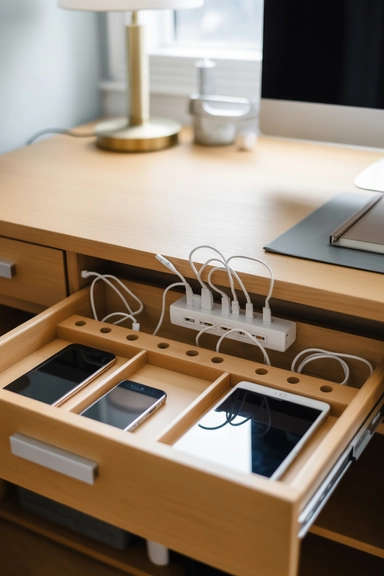
I tried leaving devices on the desk before. It looked fine for a day, then cables took over again. Moving everything into a drawer changed that completely.
A simple drawer setup keeps devices and cords out of sight while still charging normally. The surface stays clean, and you don’t deal with visual clutter all the time.
Here’s what worked for me:
- Power strip at the back so cables stay contained
- Separate slots for each device to avoid tangling
- Cable holes to guide wires instead of letting them pile up
One mistake I made early was overfilling the drawer. That kills the system fast. Leave some space so cords don’t press and mix together.
Once everything has a fixed spot, you stop adjusting cables every day. You plug in, close the drawer, and forget about it..
If cords still end up tangled inside drawers, it means they’re not being separated properly. This is where drawer divider setups make a huge difference before the mess builds up again.
Wall-Mounted Charging Shelves With Hidden Cable Channels
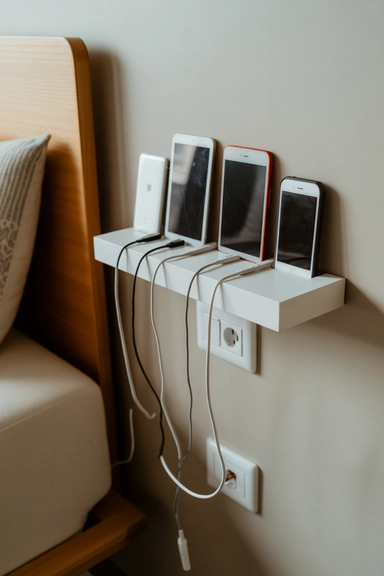
I tried using a regular shelf first. Devices sat there fine, but the cables hanging down ruined the look. The fix wasn’t the shelf. It was how I routed the wires.
Once I drilled a small hole behind the shelf and fed the cables through, everything changed. From the front, it looked clean. No dangling wires, no mess pulling your eyes down.
Here’s what actually worked:
- Hidden cable path behind the shelf so wires don’t show
- Short cable lengths to avoid extra loops
- Power source tucked behind or below so it stays out of sight
One thing I noticed. If cables hang even a little, they spread over time. Keeping them fixed in one path stops that before it starts.
Now devices sit neatly, charge easily, and the area stays clean without constant fixing.
If cables still hang or spread even after using shelves, the issue is usually poor routing, not the setup itself. This is where wall organization solutions help keep everything controlled before it turns messy again.
Decorative Charging Boxes That Conceal Power Strips
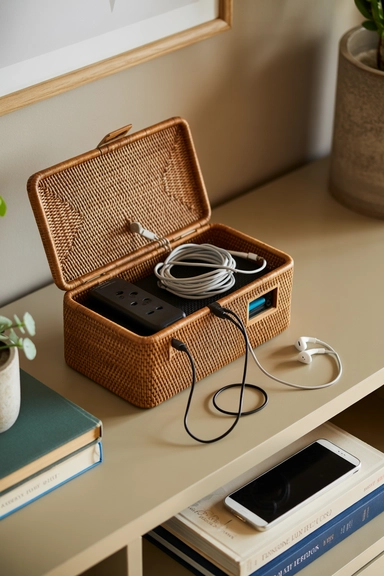
Power strips used to be the ugliest part of my setup. Even when everything else looked fine, that one strip with tangled cables ruined the whole area.
I fixed it by using a simple box to hide everything inside. Not fancy, just something that holds the strip and extra cable length while only the short charging ends come out.
What worked best for me:
- Box large enough to hold the strip and extra cords without squeezing
- Only short cables visible so nothing spreads on the surface
- Placed near a wall so it stays out of the main view
At first I tried stuffing everything into a small box. Bad idea. It overheated and became messy again. Give cables space to sit properly.
Now the surface looks clean, and I don’t see that cable mess every time I walk in. Huge difference for such a simple fix.
Pegboard Charging Walls That Route Cords Behind the Surface
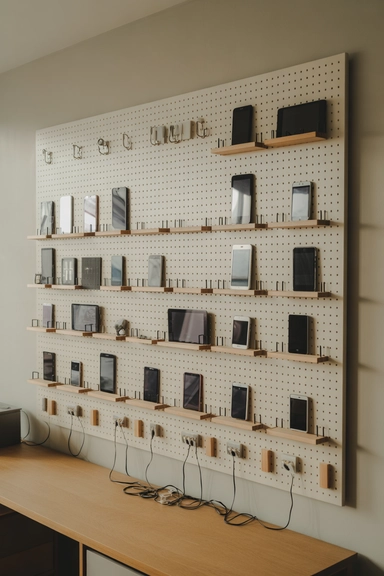
I didn’t expect this to work as well as it did. A pegboard looked like a simple idea, but it solved one big problem for me, cables spreading everywhere.
Instead of letting wires sit on a desk, I mounted a pegboard and routed cables behind it. Devices hang or sit on small shelves, while cords stay mostly out of sight.
What actually made the difference:
- Cables routed behind the board so they don’t pool on surfaces
- Hooks and mini shelves to give each device a fixed spot
- Cable clips at the back to stop wires from crossing
At first I left the cables loose behind the board. That turned messy again. Once I clipped them in place, everything stayed controlled.
Now I can see every device clearly, and nothing spreads across the desk. It stays organized without extra effort.
Entryway Charging Stations That Contain Daily Device Drop Zones

I noticed most of my cable mess started right at the entrance. Phone in hand, low battery, quick drop… and suddenly cables start piling up in the same spot every day.
So I fixed it by creating a small, dedicated charging zone in the entry area. Not big, just controlled.
Here’s what actually worked for me:
- Hidden power strip inside a cabinet or behind a console so wires don’t stay visible
- Short cables only to stop them from spreading across the surface
- Fixed device spots so nothing gets stacked randomly
One thing most people miss. If there’s no defined drop zone, devices will spread no matter what system you use. You need a clear “this is where it goes” setup.
Now when I walk in, I plug in and leave. No cable mess building up, no random piles forming. It stays under control without thinking about it.
If devices keep piling up near the entrance, it means there’s no defined drop system. This is where entryway organization ideas help control clutter before it spreads inside the home.
Bedside Charging Pockets That Keep Nightstands Clear
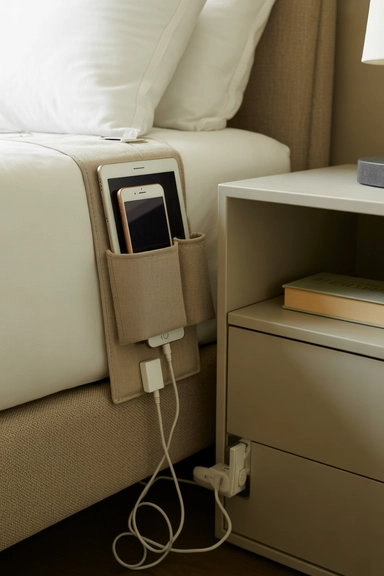
Nightstands quickly become crowded with cables, especially when multiple devices charge overnight. A bedside charging pocket or fabric caddy attached to the bed frame keeps cords routed along the side instead of across the tabletop. Chargers feed through the pocket’s interior channels, leaving only minimal cable length visible.
Keep power strips secured behind the nightstand or mounted to the frame so cords don’t fall to the floor. Devices slide into individual compartments, preventing them from stacking or tangling. These charging station organization ideas maintain a calm bedside surface while still keeping electronics within reach. When cords are contained vertically, nightstands remain usable and visually uncluttered.
Kitchen Charging Drawers That Disappear Into Cabinetry
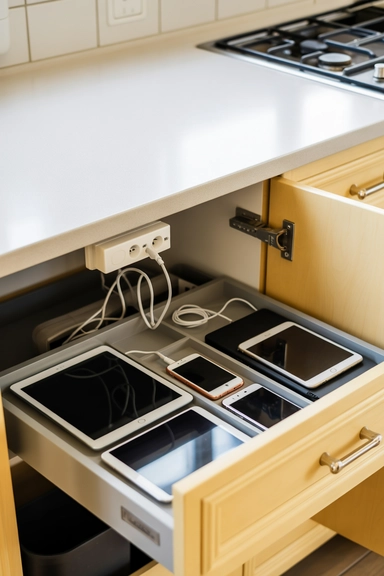
My kitchen counter used to turn into a charging station without me noticing. One cable, then two, then suddenly everything is plugged in right where I cook.
So I moved everything into a drawer. That single change cleaned up the entire space.
Here’s what actually worked for me:
- Power strip inside the drawer so cables stay hidden
- Small cable holes at the back to guide wires cleanly
- Fixed spots for each device so nothing overlaps
At first, I just threw everything inside. That turned messy again. Once I gave each device its own place, the system started working.
Now the counter stays clear, and I still have everything charging in one place. No more cables near food or prep space.
Desktop Charging Trays That Keep Work Surfaces Clear

My desk used to get messy fast. One charger turns into three, and suddenly cables are running across the whole surface.
What helped was using a simple tray to control where everything sits and where cables go.
Here’s what worked for me:
- Tray at the back of the desk so cables don’t run across the front
- Cables routed through the back to keep only short lengths visible
- Clips underneath to hold extra wire and stop movement
At first, I ignored cable length. Big mistake. Extra wire kept sliding forward and ruining the setup.
Now everything returns to one spot after use. The desk stays clean, and I can actually focus without cables in the way.
If cables start spreading across your desk again, it means they’re not being contained at the source. This is where home office storage ideas help keep everything controlled before it turns into clutter.
Wall Shelf Charging Ledges That Lift Devices Off Surfaces
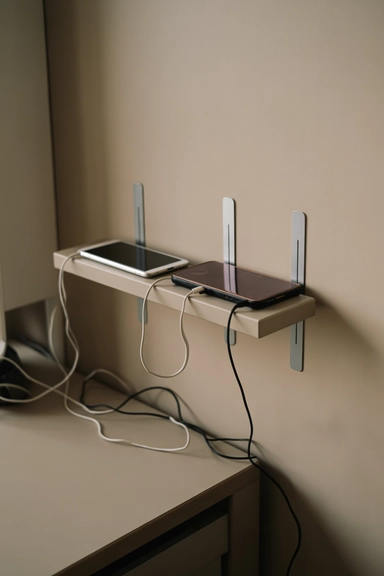
I ran out of desk space fast, so I moved charging to the wall. That alone freed up the surface and made the whole setup feel lighter.
A narrow shelf near an outlet works best. Devices sit on the ledge while cables run behind it, so you don’t see wires hanging down.
Here’s what worked for me:
- Shallow shelf so devices don’t stack or block each other
- Cables routed behind the shelf to keep them out of sight
- Clips along the back edge so wires don’t slip forward
At first, I placed the shelf too deep. Devices started piling up again. Keeping it narrow forced everything to stay organized.
Now charging happens on the wall, not on my desk. More space, less clutter, and no cables spreading everywhere.
Family Charging Cabinets With Individual Device Slots
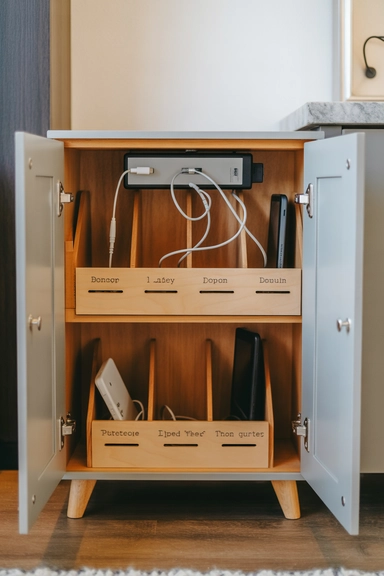
When more than one person starts charging devices in the same spot, things get messy fast. I’ve seen cables cross, devices stack, and nobody knows which charger belongs to what.
A small cabinet with sections fixes that. Each person gets a space, and cables stay in their own lane instead of mixing together.
Here’s what worked for me:
- Separate slots so each device has its own place
- Hidden power strip inside to keep cables out of sight
- Short dedicated cables so wires don’t cross over
One thing that helped a lot was keeping it consistent. If devices go back to the same spot every time, the system holds. If not, it breaks quickly.
Now everything charges in one place without turning into a mess. No guessing, no tangled cables, just a clean setup that actually stays organized.
Drawer Insert Charging Systems That Separate Every Cable
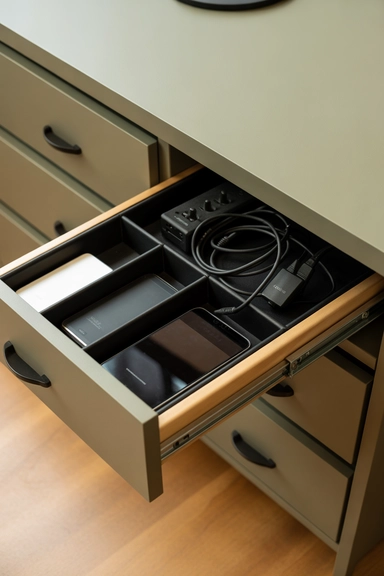
I thought throwing chargers into a drawer would fix the mess. It didn’t. Within days, everything turned into a knot of cables again.
The real fix was separating each cable. Once I used a simple drawer insert, every charger had its own path instead of crossing over others.
Here’s what worked for me:
- Divided sections so each cable stays in its own space
- Power strip at the back to keep the setup clean
- Individual cable routes so wires don’t overlap
I also made sure not to overfill the drawer. When devices are packed too tight, cables press together and start tangling again.
Now I can open the drawer and grab any charger without pulling three others with it. Everything stays in place, and the mess doesn’t come back.
Closet Charging Stations That Hide Devices Completely
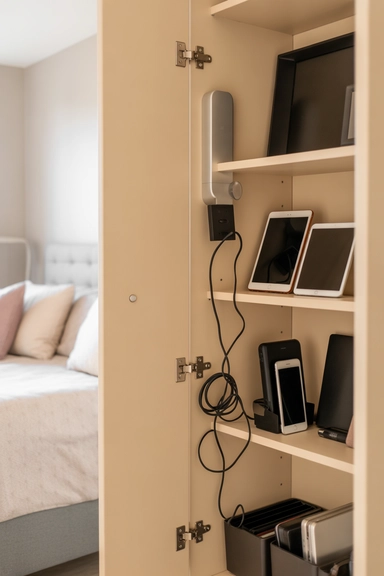
I didn’t want cables showing in the bedroom at all, so I moved charging into a closet shelf. That kept devices powered without turning visible areas into a mess.
The key is keeping everything tucked away but still organized. Otherwise, it just becomes hidden clutter.
Here’s what worked for me:
- Power strip at the back of the shelf so nothing shows from the front
- Cable clips along the side wall to guide wires in one direction
- Small bins or dividers so devices don’t slide and mix together
At first, I skipped the clips. Bad move. Cables started drifting and tangling again even inside the closet.
Now everything charges out of sight, and my main spaces stay clean. I don’t see cables, and I don’t deal with clutter spreading outside.
Floating Nightstand Chargers With Hidden Cord Channels
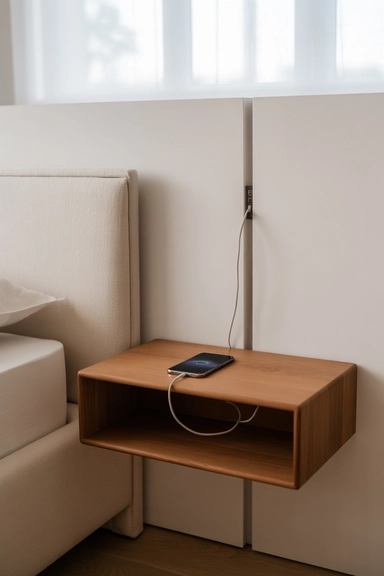
I switched to a floating nightstand to clear floor space, but the cables still showed at first. The fix was routing them along the wall instead of letting them hang.
Once I used adhesive cable channels behind and under the nightstand, only short cable ends stayed visible on top. No more wires draping over the edge.
Here’s what worked for me:
- Cable channels behind the unit so wires follow one clean path
- Power strip mounted underneath to keep everything contained
- Short cable lengths so nothing loops onto the surface
I tried leaving the cables loose at first. They slowly slipped forward and ruined the look again. Securing the path fixed that.
Now the bedside stays minimal. Devices charge normally, but the cables stay out of sight and off the floor.
Charging Baskets With Routed Cable Openings
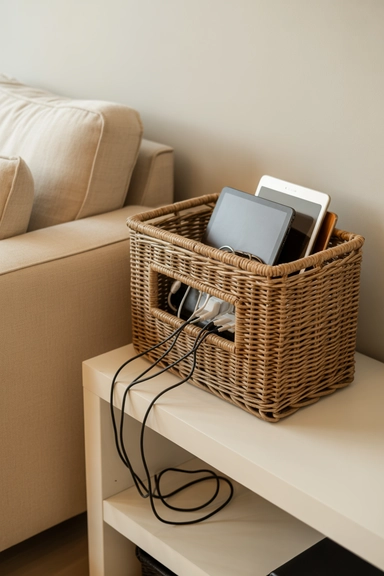
I tried using a basket for charging, but at first it turned into a cable dump. Everything sat inside, but cords kept tangling at the bottom.
The fix was controlling how cables enter and stay in place. Once I routed them properly, the basket actually worked as a clean, flexible charging spot.
Here’s what worked for me:
- Small opening at the back so cables feed in one direction
- Clips to hold cable length so wires don’t gather inside
- Fixed spots for devices so nothing overlaps
At first, I let cables fall freely into the basket. That created a mess again within days. Keeping them guided made all the difference.
Now I can move the basket anywhere without dragging cables across surfaces. It stays neat, and the clutter doesn’t build up again.
If cables start collecting inside baskets, it means they’re not being controlled properly. This is where storage bin organization ideas help keep everything separated before it turns into a mess again.
Under-Desk Charging Mounts That Clear the Floor
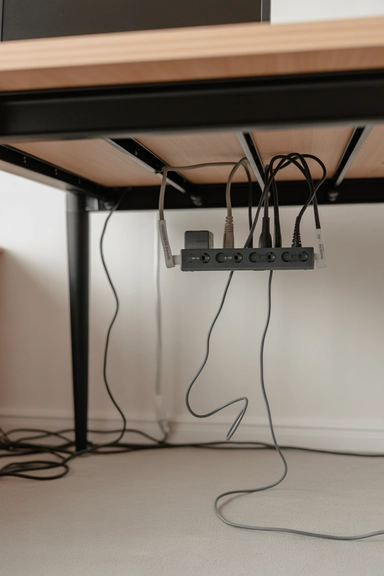
I used to have cables all over the floor under my desk. They got stuck in chair wheels, tangled with each other, and honestly just looked messy.
Mounting the power strip under the desk fixed most of that instantly. Cables stayed off the floor, and everything felt cleaner without changing much on top.
Here’s what worked for me:
- Power strip mounted underneath so nothing sits on the floor
- Cable guides under the desk to keep wires straight
- Minimal slack above so cables don’t spread across the surface
At first, I didn’t guide the cables properly. They still crossed and looked messy underneath. Once I fixed their path, everything stayed in place.
Now nothing gets caught in the chair, and the floor stays clear. It’s one of the simplest setups that actually makes a big difference.
Cabinet Door Charging Racks That Use Hidden Vertical Space
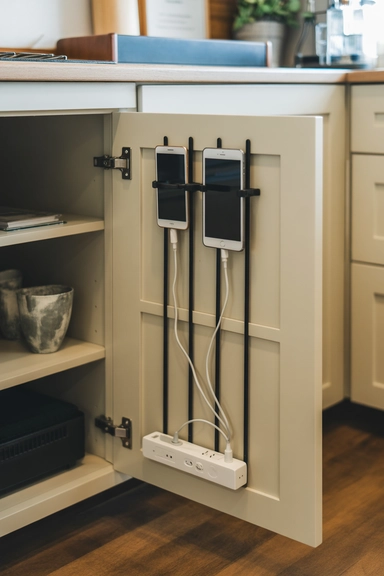
I overlooked cabinet doors for a long time. Turns out, they’re perfect for hiding charging setups without using shelf space.
Once I added slim holders inside the door, devices stayed upright and separated instead of stacking in a messy pile.
Here’s what worked for me:
- Power strip at the bottom inside the cabinet so cables stay hidden
- Vertical holders or pockets to keep devices separated
- Cables routed along the edge so they don’t cross inside
I made one mistake early. I let cables hang freely inside, and they started tangling again. Securing them along the frame fixed that.
Now everything charges behind the door, completely out of sight. No clutter outside, and no cables spreading across surfaces.
Multi-Device Charging Docks With Structured Cord Routing
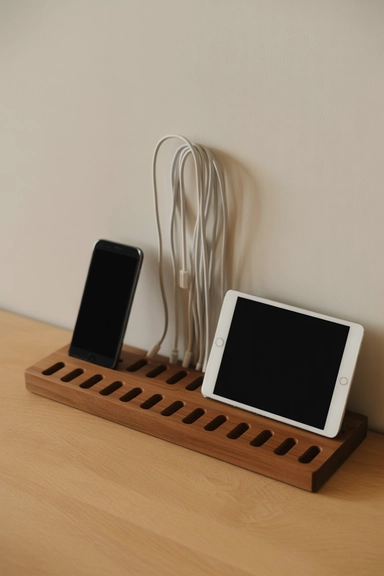
I tried charging multiple devices side by side without a system. They leaned on each other, cables crossed, and it looked messy within a day.
A structured charging dock fixed that. Each device gets its own slot, and each cable follows a separate path.
Here’s what worked for me:
- Dock with fixed slots so devices don’t stack or lean
- Dedicated cable channels to keep wires from overlapping
- Dock placed against a wall to hide the back side
At first, I ignored cable length. Extra wire spilled out behind the dock and ruined the setup. Short cables and securing the excess fixed it.
Now everything lines up cleanly. No crossing wires, no shifting devices, and the setup stays organized without effort.
Wall Charging Panels With Concealed Outlet Access
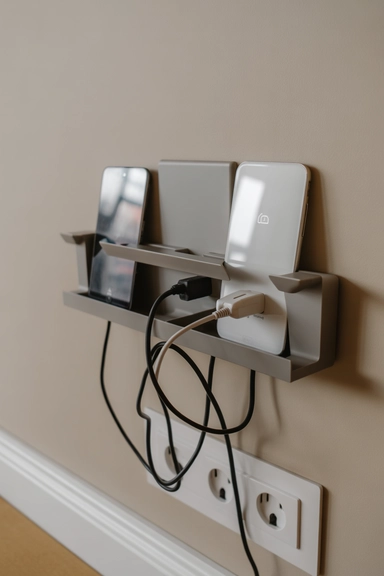
I wanted something cleaner than a shelf, so I tried a wall charging panel. The difference was immediate. Devices stayed visible, but the cables disappeared behind the structure.
Everything plugs in behind the panel, so from the front you only see the devices, not the wiring.
Here’s what worked for me:
- Panel mounted over an outlet so cables stay hidden behind it
- Built-in sections or ledges to keep devices from sliding
- Cable guides inside to stop wires from crossing
At first, I picked a panel that was too shallow. Devices kept slipping forward. Choosing the right depth fixed that quickly.
Now the wall looks clean, devices stay in place, and there are no hanging wires to deal with.
Charging Drawers With Dedicated Cable Ports
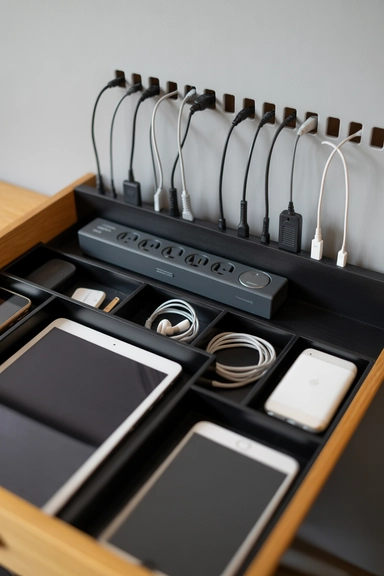
I used a charging drawer before, but everything still got tangled inside. The problem was simple. All cables were coming through one hole.
Once I gave each device its own cable opening, the setup finally worked. Cables stayed in their path instead of crossing and mixing together.
Here’s what worked for me:
- Separate cable holes so each wire follows a straight path
- Short cables matched to drawer depth to avoid extra loops
- Flat placement for devices so nothing stacks or presses on cords
At first, I kept using long cables. They piled up inside and ruined the setup again. Switching to shorter ones fixed it immediately.
Now when I open the drawer, everything is clean and easy to grab. No pulling one cable and dragging three with it.
Decorative Console Charging Stations That Blend With Decor
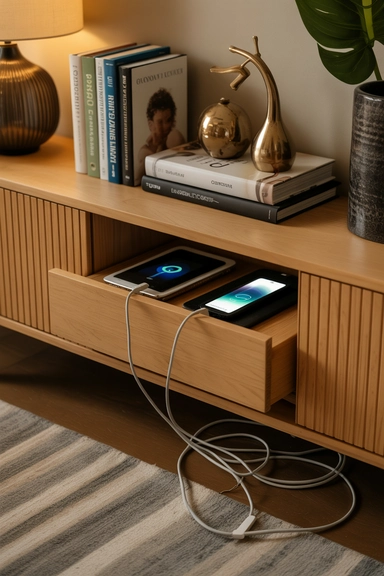
I didn’t want chargers ruining the look of my living room, so I used a console table instead. From the front, it looks like normal decor. Behind it, everything is charging.
The trick is hiding the cables properly so nothing peeks out.
Here’s what worked for me:
- Cables routed through the back panel so they stay out of sight
- Power strip mounted underneath or inside to hide the source
- Clips along the back edge to keep wires from slipping forward
At first, I let cables hang loosely behind the table. They slowly showed up from the sides and ruined the clean look. Securing them fixed that.
Now the space looks styled, not tech-heavy. Devices charge quietly in the background, and no one sees the mess.
21. Minimal Charging Corners That Limit Cable Spread
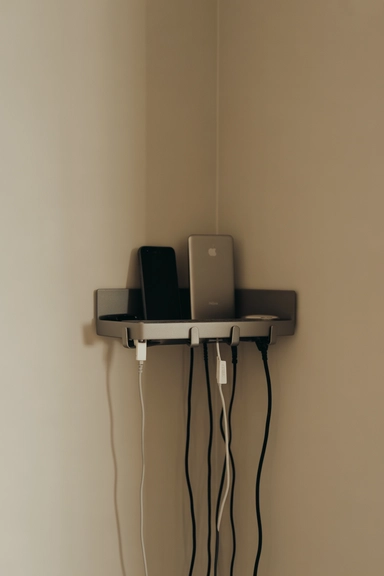
I used to charge devices in different spots around the house. Bedroom, desk, kitchen… and the cables just kept spreading.
What finally worked was creating one small charging corner. Everything goes there, no exceptions.
Here’s what worked for me:
- One fixed spot like a shelf, drawer, or cabinet
- Cables routed along the wall so they don’t extend into the room
- Limited space so devices don’t pile up
At first, I made the area too big. That just invited more devices and more cables. Keeping it small forced everything to stay under control.
Now I don’t deal with cables all over the house. Everything charges in one place, and the rest of the space stays clean.
If charging areas keep spreading across different rooms, it means there’s no single control point. This is where home organization ideas help bring everything into one system before clutter takes over again.
Conclusion
I used to think buying better organizers would fix my charging mess. It didn’t. The real fix was controlling how cables move and where they stay.
Once I set clear paths, limited cable length, and kept everything in one system, the difference was obvious. Less clutter, less time fixing things, and no cables slowly taking over again.
The main thing that works? Keep it controlled. Not just hidden.
If your setup still feels messy, it usually means cables are still free to spread somewhere.
Fix that now, or you’ll keep dealing with the same problem again home organization ideas you’ll wish you used earlier.